Garment Cache to Alembic
发布于:2024-11-21
Function Description
Support to convert the recorded garment cache to Alembic format and export it to DCC for modification.
Export the Alembic back to UE after modification.
It is suitable for fixing cache through mold problems, and small-scale adjustment of solver effects.
Operating Instructions
Exporting Alembic
- Select Garment Cache To Alembic from the drop-down menu.

- Cache Export Configuration

Garment Integrate Mode | Single Garment or Multi Garment |
Meta Data Asset | for Single Garment mode |
Garment Asset Map | for Multi Garment mode |
Exist Cache | Garment corresponds to the recorded cache |
Cache to Export | Name of the cache to export |
Editor UV | Whether to export editable UVs |
Export Mesh Type | Simulation:Export solver mesh abc (without thickness) Render:Export render mesh (high-poly) |
Export Render Proxy Mesh | Export render mesh (high-poly) |
Export Cloth Thick Mesh | Exporting garment back and side meshes. |
Export Cloth Attachment | Export Accessory Mesh |
Export Cloth Patch Mesh | Export Pattern Mesh |
ABC Smoothing Setting
When using mesh proxies for clothing simulation, rendering artifacts such as aliasing and local tearing may occur due to rendering mesh precision and specifications. Smoothing the mesh vertices during ABC conversion can help alleviate these issues.

Enable Smooth | Enable Smoothing |
Smoothing Steps | Smoothing Iterations |
Smoothing Per Step | Smoothing Strength per Iteration |
Smoothing is a global operation and should not be set with overly large parameters, as it may lead to new issues such as local penetration.
- Click Export
Editing Alembic
The exported Alembic file from the garment cache does not carry fabric thickness and attachment information, only single-layer mesh information is kept.
The exported Alembic file is aligned with the character animation in Maya, Houdini, Blender, etc. Drag and drop the garment with the brush tool to fix the cache through mold problem.
Importing Alembic
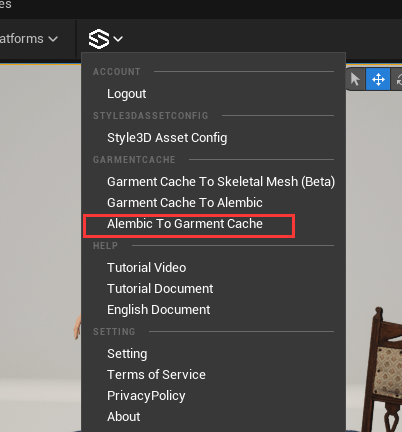
- Menu selectes Alembic To Garment Cache
- Select abc
- Configure garment, cache name after import, click Import
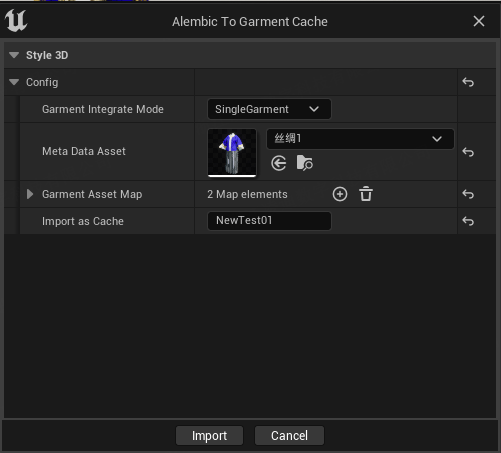
Alembic will be converted into a garment cache with thickness and attachment information during play.