Material Mapping
发布于:2024-11-21
Function Description
When importing Unreal from SMD, the material ball is converted to a custom parent material through the material configuration table.
- Please check"Style icon - Style3D Asset Config - Using Baking Texture"
- When export from Style3D software as SMD file,please check "Bake All Texture"
Operating Instructions
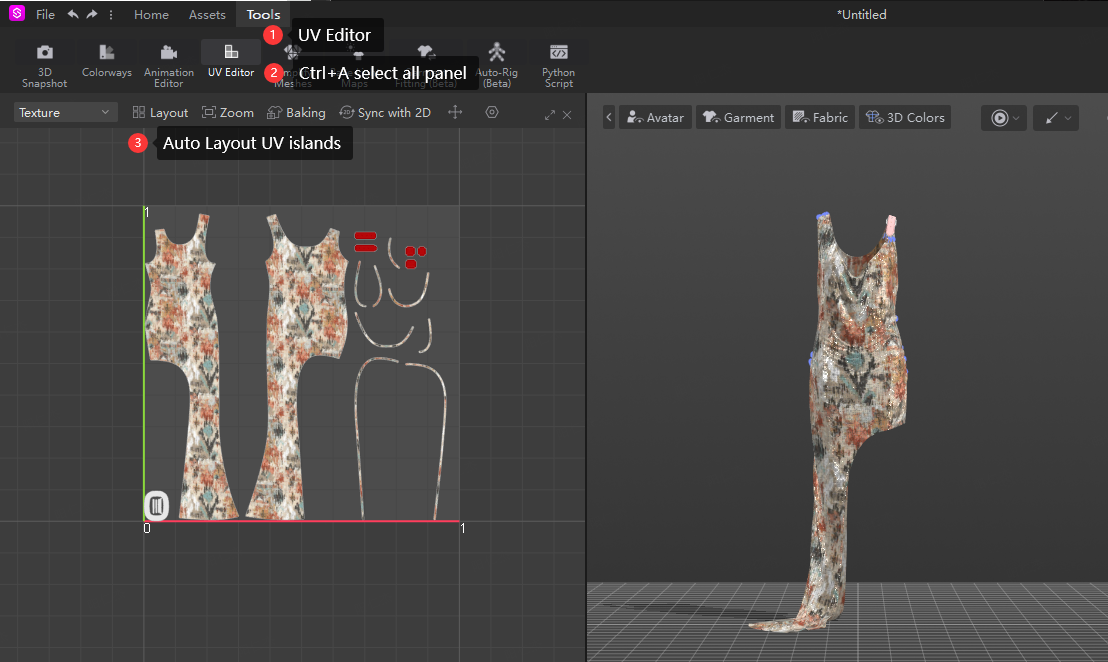
Style3D Bake Export SMD
- UV Editor
- Selected all cloth panel
- Auto or manual layout UV
- Export SMD File,check "Bake All Maps"
UV Editor can't click "Bake Light Maps",It will affect the baking result.
In UE Config Material Mapping
Drop-down menu at the top of the toolbar click "Style3DAsset Config"
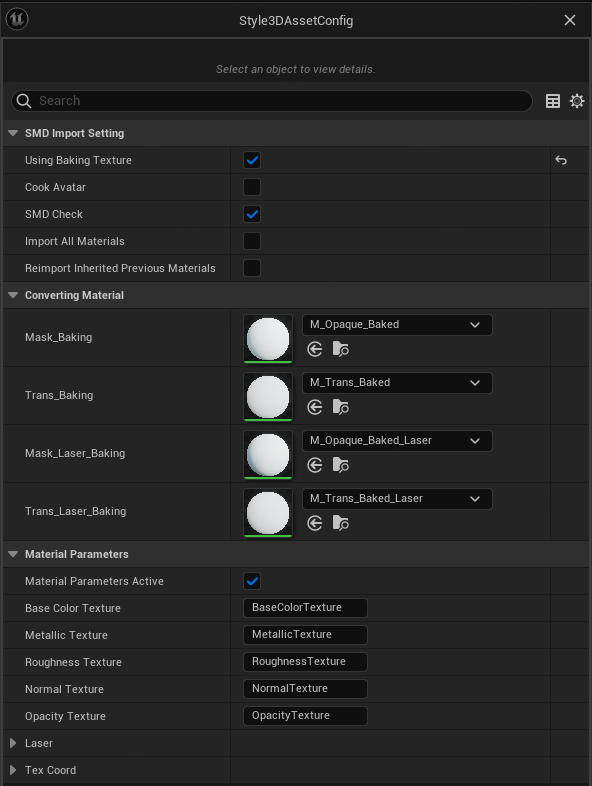
SMD Import Setting
Using Baking Texture | Whether to use baking, check SMD import to use baking material; Do not check the default materials corresponding to Atelier Material interface |
Cook Preview Mesh | Generate clothing static Mesh with thickness The location is in the clothing folder _Mesh folder, and the clothing name PreviewMesh |
Cook Avatar | Import human model information (reserved interface) |
SMD Check | The resource check switch can detect imported clothing
Comment |
Import All Materials | Import all materials (baked and non-baked) |
Reimport Inherited Previous Materials | Reimport SMD to inherit the material from the original garment |
Converting Material
Baking process process SMD material types:
Blend Mode | Parent Material |
|---|---|
Mask_Baking | M_Opaque_Baked |
Trans_Baking | M_Trans_Baked |
Mask_Laser_Baking | M_Opaque_Baked_laser |
Trans_Laser_Baking | M_Trans_Baked_Laser |
Non-baking process SMD material types:
Blend Mode | Parent Material |
|---|---|
Fabric_Opaque | M_Fabric_Opaque |
Default_Opaque | M_Default_Opaque |
Opaque_Laser | M_Opaque_Laser |
Trans_Fabric | M_Fabric_Trans |
Trans_Laser | M_Trans_Laser |
Material Parameters
Modify the material parameter name. Change the name here, you can change the parameter name of the plug-in default material modification to the corresponding material parameter name of your choice.
Custom Cloth Material
- When customizing the parent material, it is necessary to set the material details
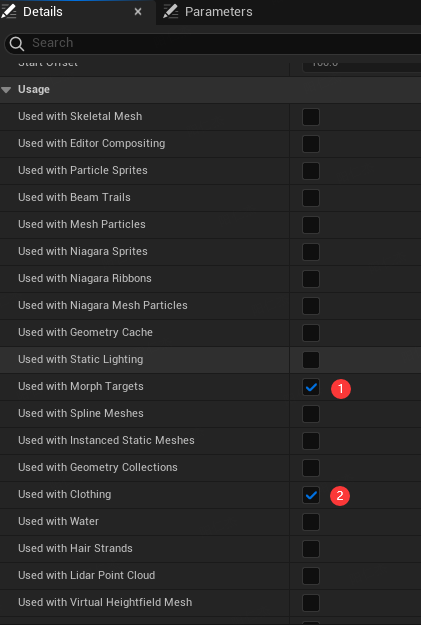
- Replace the custom Material with the Converting Material slot in the material map, and change the parameter mapping in Material Parameters
- Import files are automatically converted,After modifying the material mapping table, the subsequent imported SMD clothing will automatically use the new parent material according to the configuration table
The SMD imported before can be re-imported by right click, and then updated to the custom parent material according to the configuration table
Comment