Add Tack in UE
发布于:2024-11-21
Feature Overview
Adding faux seam constraints between clothing pieces in the clothing interface.
Usage Steps
Open the Tack mode.
.webp?alt=media&token=a6e8d017-9cc3-41ee-9dff-ba8d0bf02600)
1. Add Tack
Click on two points on the clothing pieces to create a tack.
.webp?alt=media&token=a6fe97b7-e6ef-48cd-bf52-e93382ed474c)
To cancel the first tack point: Right-click and select "Cancel Tack."
.webp?alt=media&token=4bcf6c9c-d0dd-44bb-9e2d-52beaf91f8f3)
To delete a tack: Click to select the tack, then Press Delete to delete the Tack.
.webp?alt=media&token=a3a675c7-3ab6-4dd3-be37-176bdce50ade)
Adjust the thread length:
- ThreadLength: The distance between two points during simulation should not exceed the thread length.
- Strength: tack constraint strength.
.webp?alt=media&token=583ea191-6b6d-41cd-894e-063abb9472d2)
To disable all tack: Style3D component -> Solver Property -> Tack.
.webp?alt=media&token=e29f11ee-9d03-4579-bac6-a347b0ada088)
2. Edit Tack (V2.4.0)
Switch to Edit Tack tool for editing tacks.
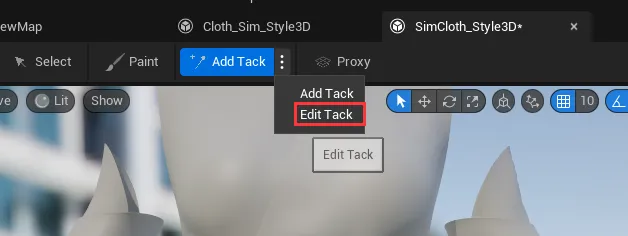
Move the mouse pointer to the edge of the tack and drag it to the new position.
