Login page abnormal popup
发布于:2024-10-09
This document records the abnormal pop-ups encountered during login and the corresponding solutions. You can refer to the specific error message to find the appropriate solution.
This account has already logined on other computer (Error Code: 6001). Please logout first(Devive Name: ) and try again.

Answer: ① Update the software version: Versions updated after July 30, 2024, support quick unbinding. ② Log in to the Cloud platform: Go to the Style3D fabric download page (Fabric download link) and click on "Unbind this device." If you still cannot log in after this step, or if the "Unbind Device" button does not appear, please provide your login username to the Lingdi technical support team for assistance with unbinding.

Unable to establish connection to the server; current device's date/time might not be correct, please try again
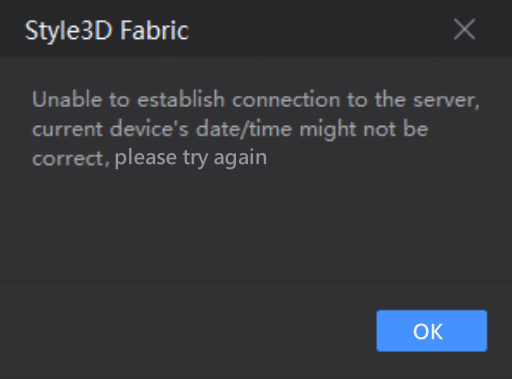
Reason: This is due to a mismatch between the computer's local time and the network time. The time needs to be synchronized on the computer.
Answer: Windows Settings ▶ Time & Language ▶ Date & Time ▶ Sync Now

Login unsuccessful, with the message "Incorrect Username or Password." After clicking, the login window remains on the desktop and cannot be closed.
Answer: Go to "This PC" and navigate to the following path. Delete the contents of the "Preference" folder, then reopen the software.
path: C:\Users\admin\AppData\Local\Style3DFabric\Preference
You can quickly jump to the Local folder by typing %localappdata% in the address bar, then add \Style3DFabric to the path and delete the contents of the "Preference" folder.


Since there are other devices still active, it is not possible to log out from all at once. Please log out from each device individually.
Answer: You can use the following link to access the Fabric software tool: Style3D Fabric
click to unbind the device, and then log in again.
If you still cannot log in, you will need to revoke the authorization and then re-authorize the account before logging in again.
Ways to revoke authorization:
- Administrator directly grants authorization.
- Employee account requests authorization.
Relevant link:Fabric Getting Started | Style3D Fabric Help Center
There is currently an old version of Style3D Fabric logged in(Device Name: %1), please try again after closing the software in that device.
Reason: The old version of the software was logged in previously and was not logged out.
Answer: Provide your account username to the Lingdi technical staff for assistance in resolving the issue.

A device that meets the software's minimum requirements (integrated graphics) encounters the error 'OpenGL interface init failed! Please update graphics driver, or use a newer card.'

Answer: Visit the Intel official website to update the integrated graphics driver.
Cannot locate the program entry point GetSystemTimePreciseAsFileTime
Details of the issue: On a Windows 7 system with a dedicated graphics card, installing the latest version prompts the error 'Unable to locate the program entry point GetSystemTimePreciseAsFileTime in dynamic link library KERNEL32.dll.
Reason: The operating system version is too old.
Answer: It is recommended to upgrade to Windows 10 or 11